tfjs-models
Pose Detection in the Browser: PoseNet Model
Note: We’ve just released Version 2.0 with a new ResNet model and API. Check out the new documentation below.
This package contains a standalone model called PoseNet, as well as some demos, for running real-time pose estimation in the browser using TensorFlow.js.
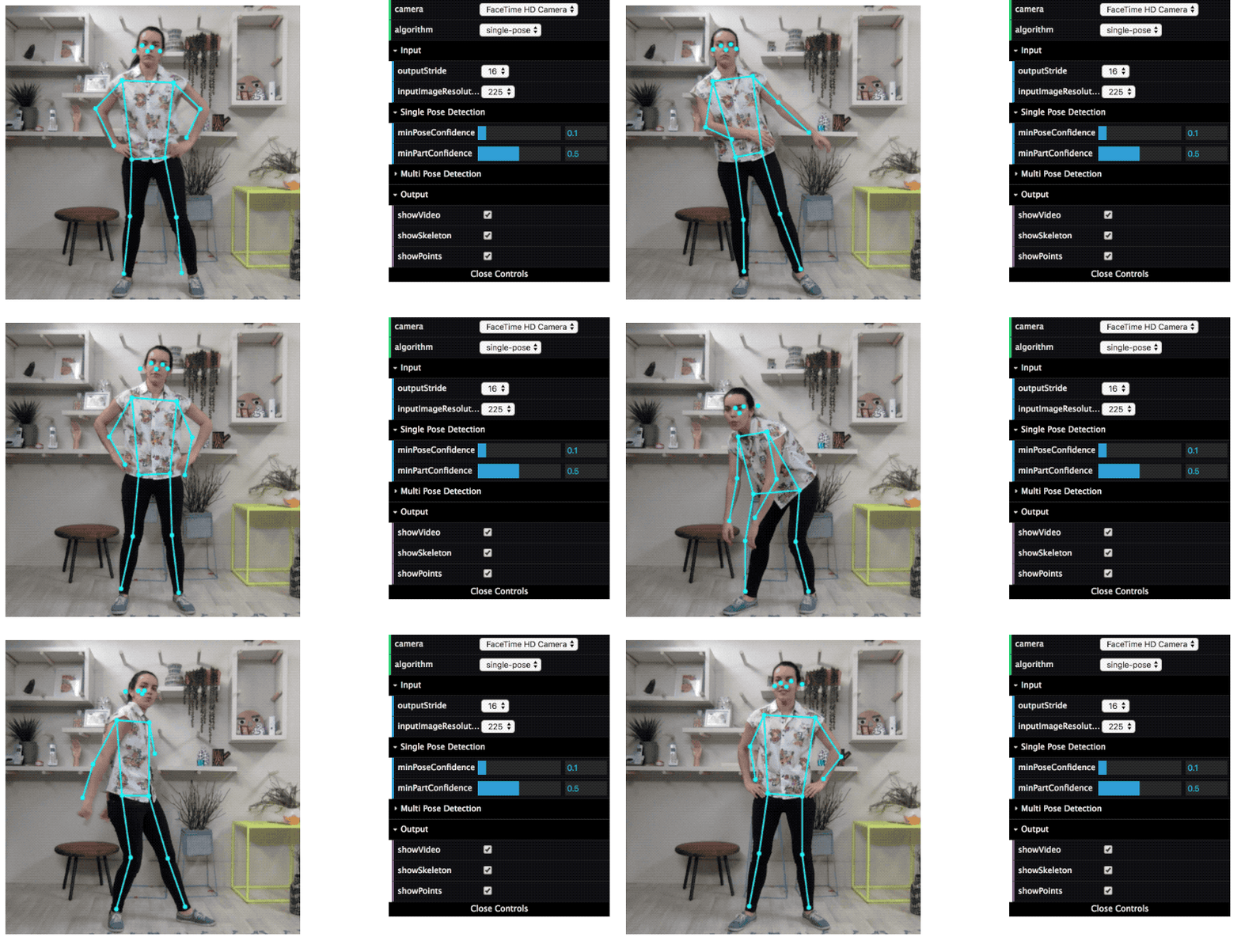
PoseNet can be used to estimate either a single pose or multiple poses, meaning there is a version of the algorithm that can detect only one person in an image/video and one version that can detect multiple persons in an image/video.
Refer to this blog post for a high-level description of PoseNet running on Tensorflow.js.
To keep track of issues we use the tensorflow/tfjs Github repo.
Documentation Note
The README you see here is for the PoseNet 2.0 version. For README of the previous 1.0 version, please look at the README published on NPM.
Installation
You can use this as standalone es5 bundle like this:
  <script src="https://cdn.jsdelivr.net/npm/@tensorflow/tfjs"></script>
  <script src="https://cdn.jsdelivr.net/npm/@tensorflow-models/posenet"></script>
Or you can install it via npm for use in a TypeScript / ES6 project.
npm install @tensorflow-models/posenet
Usage
Either a single pose or multiple poses can be estimated from an image. Each methodology has its own algorithm and set of parameters.
Loading a pre-trained PoseNet Model
In the first step of pose estimation, an image is fed through a pre-trained model. PoseNet comes with a few different versions of the model, corresponding to variances of MobileNet v1 architecture and ResNet50 architecture. To get started, a model must be loaded from a checkpoint:
const net = await posenet.load();
By default, posenet.load() loads a faster and smaller model that is based on MobileNetV1 architecture and has a lower accuracy. If you want to load the larger and more accurate model, specify the architecture explicitly in posenet.load() using a ModelConfig dictionary:
MobileNet (smaller, faster, less accurate)
const net = await posenet.load({
  architecture: 'MobileNetV1',
  outputStride: 16,
  inputResolution: { width: 640, height: 480 },
  multiplier: 0.75
});
ResNet (larger, slower, more accurate) **new!**
const net = await posenet.load({
  architecture: 'ResNet50',
  outputStride: 32,
  inputResolution: { width: 257, height: 200 },
  quantBytes: 2
});
Config params in posenet.load()
-
architecture - Can be either
MobileNetV1orResNet50. It determines which PoseNet architecture to load. -
outputStride - Can be one of
8,16,32(Stride16,32are supported for the ResNet architecture and stride8,16,32are supported for the MobileNetV1 architecture). It specifies the output stride of the PoseNet model. The smaller the value, the larger the output resolution, and more accurate the model at the cost of speed. Set this to a larger value to increase speed at the cost of accuracy. -
inputResolution - A
numberor anObjectof type{width: number, height: number}. Defaults to257.It specifies the size the image is resized and padded to before it is fed into the PoseNet model. The larger the value, the more accurate the model at the cost of speed. Set this to a smaller value to increase speed at the cost of accuracy. If a number is provided, the image will be resized and padded to be a square with the same width and height. Ifwidthandheightare provided, the image will be resized and padded to the specified width and height. -
multiplier - Can be one of
1.01,1.0,0.75, or0.50(The value is used only by the MobileNetV1 architecture and not by the ResNet architecture). It is the float multiplier for the depth (number of channels) for all convolution ops. The larger the value, the larger the size of the layers, and more accurate the model at the cost of speed. Set this to a smaller value to increase speed at the cost of accuracy. -
quantBytes - This argument controls the bytes used for weight quantization. The available options are:
-
4. 4 bytes per float (no quantization). Leads to highest accuracy and original model size (~90MB). 2. 2 bytes per float. Leads to slightly lower accuracy and 2x model size reduction (~45MB).1. 1 byte per float. Leads to lower accuracy and 4x model size reduction (~22MB).
-
-
modelUrl - An optional string that specifies custom url of the model. This is useful for local development or countries that don’t have access to the model hosted on GCP.
By default, PoseNet loads a MobileNetV1 architecture with a 0.75 multiplier. This is recommended for computers with mid-range/lower-end GPUs. A model with a 0.50 multiplier is recommended for mobile. The ResNet achitecture is recommended for computers with even more powerful GPUs.
Single-Person Pose Estimation
Single pose estimation is the simpler and faster of the two algorithms. Its ideal use case is for when there is only one person in the image. The disadvantage is that if there are multiple persons in an image, keypoints from both persons will likely be estimated as being part of the same single pose—meaning, for example, that person #1’s left arm and person #2’s right knee might be conflated by the algorithm as belonging to the same pose. Both the MobileNetV1 and the ResNet architecture support single-person pose estimation. The method returns a single pose:
const net = await posenet.load();

const pose = await net.estimateSinglePose(image, {
  flipHorizontal: false
});
Params in estimateSinglePose()
- image - ImageData|HTMLImageElement|HTMLCanvasElement|HTMLVideoElement The input image to feed through the network.
- inferenceConfig - an object containing:
- flipHorizontal - Defaults to false. If the pose should be flipped/mirrored horizontally. This should be set to true for videos where the video is by default flipped horizontally (i.e. a webcam), and you want the poses to be returned in the proper orientation.
Returns
It returns a Promise that resolves with a single pose. The pose has a confidence score and an array of keypoints indexed by part id, each with a score and position.
Example Usage
via Script Tag
<html>
  <head>
    <!-- Load TensorFlow.js -->
    <script src="https://cdn.jsdelivr.net/npm/@tensorflow/tfjs"></script>
    <!-- Load Posenet -->
    <script src="https://cdn.jsdelivr.net/npm/@tensorflow-models/posenet"></script>
 </head>

  <body>
    <img id='cat' src='/images/cat.jpg '/>
  </body>
  <!-- Place your code in the script tag below. You can also use an external .js file -->
  <script>
    var flipHorizontal = false;

    var imageElement = document.getElementById('cat');

    posenet.load().then(function(net) {
      const pose = net.estimateSinglePose(imageElement, {
        flipHorizontal: true
      });
      return pose;
    }).then(function(pose){
      console.log(pose);
    })
  </script>
</html>
via NPM
const posenet = require('@tensorflow-models/posenet');

async function estimatePoseOnImage(imageElement) {
  // load the posenet model from a checkpoint
  const net = await posenet.load();

  const pose = await net.estimateSinglePose(imageElement, {
    flipHorizontal: false
  });
  return pose;
}

const imageElement = document.getElementById('cat');

const pose = estimatePoseOnImage(imageElement);

console.log(pose);
which would produce the output:
{
  "score": 0.32371445304906,
  "keypoints": [
    {
      "position": {
        "y": 76.291801452637,
        "x": 253.36747741699
      },
      "part": "nose",
      "score": 0.99539834260941
    },
    {
      "position": {
        "y": 71.10383605957,
        "x": 253.54365539551
      },
      "part": "leftEye",
      "score": 0.98781454563141
    },
    {
      "position": {
        "y": 71.839515686035,
        "x": 246.00454711914
      },
      "part": "rightEye",
      "score": 0.99528175592422
    },
    {
      "position": {
        "y": 72.848854064941,
        "x": 263.08151245117
      },
      "part": "leftEar",
      "score": 0.84029853343964
    },
    {
      "position": {
        "y": 79.956565856934,
        "x": 234.26812744141
      },
      "part": "rightEar",
      "score": 0.92544466257095
    },
    {
      "position": {
        "y": 98.34538269043,
        "x": 399.64068603516
      },
      "part": "leftShoulder",
      "score": 0.99559044837952
    },
    {
      "position": {
        "y": 95.082359313965,
        "x": 458.21868896484
      },
      "part": "rightShoulder",
      "score": 0.99583911895752
    },
    {
      "position": {
        "y": 94.626205444336,
        "x": 163.94561767578
      },
      "part": "leftElbow",
      "score": 0.9518963098526
    },
    {
      "position": {
        "y": 150.2349395752,
        "x": 245.06030273438
      },
      "part": "rightElbow",
      "score": 0.98052614927292
    },
    {
      "position": {
        "y": 113.9603729248,
        "x": 393.19735717773
      },
      "part": "leftWrist",
      "score": 0.94009721279144
    },
    {
      "position": {
        "y": 186.47859191895,
        "x": 257.98034667969
      },
      "part": "rightWrist",
      "score": 0.98029226064682
    },
    {
      "position": {
        "y": 208.5266418457,
        "x": 284.46710205078
      },
      "part": "leftHip",
      "score": 0.97870296239853
    },
    {
      "position": {
        "y": 209.9910736084,
        "x": 243.31219482422
      },
      "part": "rightHip",
      "score": 0.97424703836441
    },
    {
      "position": {
        "y": 281.61965942383,
        "x": 310.93188476562
      },
      "part": "leftKnee",
      "score": 0.98368924856186
    },
    {
      "position": {
        "y": 282.80120849609,
        "x": 203.81164550781
      },
      "part": "rightKnee",
      "score": 0.96947449445724
    },
    {
      "position": {
        "y": 360.62716674805,
        "x": 292.21047973633
      },
      "part": "leftAnkle",
      "score": 0.8883239030838
    },
    {
      "position": {
        "y": 347.41177368164,
        "x": 203.88229370117
      },
      "part": "rightAnkle",
      "score": 0.8255187869072
    }
  ]
}
Keypoints
All keypoints are indexed by part id. The parts and their ids are:
| Id | Part |
|---|---|
| 0 | nose |
| 1 | leftEye |
| 2 | rightEye |
| 3 | leftEar |
| 4 | rightEar |
| 5 | leftShoulder |
| 6 | rightShoulder |
| 7 | leftElbow |
| 8 | rightElbow |
| 9 | leftWrist |
| 10 | rightWrist |
| 11 | leftHip |
| 12 | rightHip |
| 13 | leftKnee |
| 14 | rightKnee |
| 15 | leftAnkle |
| 16 | rightAnkle |
Multi-Person Pose Estimation
Multiple Pose estimation can decode multiple poses in an image. It is more complex and slightly slower than the single person algorithm, but has the advantage that if multiple people appear in an image, their detected keypoints are less likely to be associated with the wrong pose. Even if the usecase is to detect a single person’s pose, this algorithm may be more desirable in that the accidental effect of two poses being joined together won’t occur when multiple people appear in the image. It uses the Fast greedy decoding algorithm from the research paper PersonLab: Person Pose Estimation and Instance Segmentation with a Bottom-Up, Part-Based, Geometric Embedding Model. Both MobileNetV1 and ResNet architecture support multi-person pose estimation. Returns a promise that resolves with an array of poses.
const net = await posenet.load();

const poses = await net.estimateMultiplePoses(image, {
  flipHorizontal: false,
  maxDetections: 5,
  scoreThreshold: 0.5,
  nmsRadius: 20
});
Params in estimateMultiplePoses()
- image - ImageData|HTMLImageElement|HTMLCanvasElement|HTMLVideoElement The input image to feed through the network.
- inferenceConfig - an object containing:
- flipHorizontal - Defaults to false. If the poses should be flipped/mirrored horizontally. This should be set to true for videos where the video is by default flipped horizontally (i.e. a webcam), and you want the poses to be returned in the proper orientation.
- maxDetections - the maximum number of poses to detect. Defaults to 5.
- scoreThreshold - Only return instance detections that have root part score greater or equal to this value. Defaults to 0.5.
- nmsRadius - Non-maximum suppression part distance. It needs to be strictly positive. Two parts suppress each other if they are less than
nmsRadiuspixels away. Defaults to 20.
Returns
It returns a promise that resolves with an array of poses, each with a confidence score and an array of keypoints indexed by part id, each with a score and position.
via Script Tag
<html>
  <head>
    <!-- Load TensorFlow.js -->
    <script src="https://cdn.jsdelivr.net/npm/@tensorflow/tfjs"></script>
    <!-- Load Posenet -->
    <script src="https://cdn.jsdelivr.net/npm/@tensorflow-models/posenet"></script>
 </head>

  <body>
    <img id='cat' src='/images/cat.jpg '/>
  </body>
  <!-- Place your code in the script tag below. You can also use an external .js file -->
  <script>
    var imageElement = document.getElementById('cat');

    posenet.load().then(function(net){
      return net.estimateMultiplePoses(imageElement, {
        flipHorizontal: false,
        maxDetections: 2,
        scoreThreshold: 0.6,
        nmsRadius: 20})
    }).then(function(poses){
      console.log(poses);
    })
  </script>
</html>
via NPM
const posenet = require('@tensorflow-models/posenet');

async function estimateMultiplePosesOnImage(imageElement) {
  const net = await posenet.load();

  // estimate poses
  const poses = await net.estimateMultiplePoses(imageElement, {
        flipHorizontal: false,
        maxDetections: 2,
        scoreThreshold: 0.6,
        nmsRadius: 20});

  return poses;
}

const imageElement = document.getElementById('people');

const poses = estimateMultiplePosesOnImage(imageElement);

console.log(poses);
This produces the output:
[
  // pose 1
  {
    // pose score
    "score": 0.42985695206067,
    "keypoints": [
      {
        "position": {
          "x": 126.09371757507,
          "y": 97.861720561981
        },
        "part": "nose",
        "score": 0.99710708856583
      },
      {
        "position": {
          "x": 132.53466176987,
          "y": 86.429876804352
        },
        "part": "leftEye",
        "score": 0.99919074773788
      },
      {
        "position": {
          "x": 100.85626316071,
          "y": 84.421931743622
        },
        "part": "rightEye",
        "score": 0.99851280450821
      },

      ...

      {
        "position": {
          "x": 72.665352582932,
          "y": 493.34189963341
        },
        "part": "rightAnkle",
        "score": 0.0028593824245036
      }
    ],
  },
  // pose 2
  {

    // pose score
    "score": 0.13461434583673,
    "keypoints": [
      {
        "position": {
          "x": 116.58444058895,
          "y": 99.772533416748
        },
        "part": "nose",
        "score": 0.0028593824245036
      }
      {
        "position": {
          "x": 133.49897611141,
          "y": 79.644590377808
        },
        "part": "leftEye",
        "score": 0.99919074773788
      },
      {
        "position": {
          "x": 100.85626316071,
          "y": 84.421931743622
        },
        "part": "rightEye",
        "score": 0.99851280450821
      },

      ...

      {
        "position": {
          "x": 72.665352582932,
          "y": 493.34189963341
        },
        "part": "rightAnkle",
        "score": 0.0028593824245036
      }
    ],
  },
  // pose 3
  {
    // pose score
    "score": 0.13461434583673,
    "keypoints": [
      {
        "position": {
          "x": 116.58444058895,
          "y": 99.772533416748
        },
        "part": "nose",
        "score": 0.0028593824245036
      }
      {
        "position": {
          "x": 133.49897611141,
          "y": 79.644590377808
        },
        "part": "leftEye",
        "score": 0.99919074773788
      },

      ...

      {
        "position": {
          "x": 59.334579706192,
          "y": 485.5936152935
        },
        "part": "rightAnkle",
        "score": 0.004110524430871
      }
    ]
  }
]
Developing the Demos
Details for how to run the demos are included in the demos/ folder.